The main image needs a pure white background (RGB 255, 255, 255) with the product filling at least 85% of the frame, no text or props. Use at least 1,000 pixels on the longest side to enable zoom, 1,600 or more recommended. Amazon suggests six images; build the gallery to convert, not just to comply.
Most shoppers decide whether to keep looking at a listing in the first few seconds, and often on a screen a few inches wide. Amazon's own image guidance sets the technical floor; clearing it is necessary but not enough, because a compliant image can still fail to convert. Across the catalogs we manage, rebuilding a weak main image and gallery is one of the most reliable ways to lift conversion on an already-ranking listing, and it is where image optimization actually lives: the gap between "meets requirements" and "actually sells."
This guide covers Amazon's main image requirements, the technical specs, how to build the gallery and what each image should do, image suppression and how to fix it, file naming for bulk upload, variation images, how images relate to search performance, and the mistakes that quietly cost conversions.
Amazon Main Image Requirements
The main image is the one shoppers see in search results and at the top of the detail page, and Amazon enforces it strictly because it standardizes the shopping experience.
White Background and Product Fill
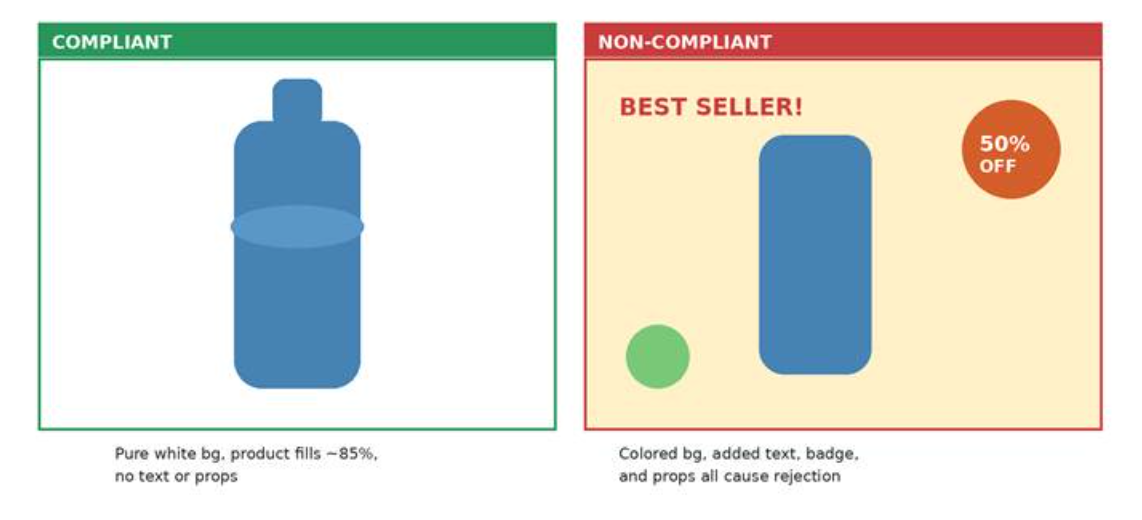
The main image must have a pure white background (RGB 255, 255, 255), and the product should fill at least 85% of the image frame so it is clearly visible, including at thumbnail size.
What Cannot Appear in the Main Image
The main image must not contain added text, graphics, logos, watermarks, badges, or props and accessories that are not part of the product being sold. These additions are a common cause of a non-compliant main image.
Show the Actual Product Accurately
The main image should be a professional photo or realistic render of the actual product, not an illustration, and it should accurately represent what the buyer receives. Main images generally should show the product outside its packaging; packaging may be appropriate when it is an important part of what the customer is buying. Because requirements vary by category, confirm your category's image style guide before publishing: you can find it in Seller Central by searching "product image requirements" in Help, or via the category-specific style guides Amazon links from its product image requirements Help pages.
Amazon Image Technical Specifications
Beyond the main-image rules, a few technical specifications apply across your image set. Use images at least 1,000 pixels on the longest side to enable zoom, which lets shoppers inspect detail. Amazon's current 2026 seller guidance recommends 1,600 pixels or more for stronger image quality. Recent Amazon seller guidance lists JPEG, PNG, TIFF, and GIF as accepted formats, with JPEG preferred. Amazon does not require a specific image aspect ratio, so prioritize compliance, product fill, and image quality rather than treating 1:1 or 3:2 as a universal requirement.
| Requirement | Amazon guidance |
|---|---|
| Main-image background | Pure white, RGB 255, 255, 255 |
| Product fill | At least 85% of the frame |
| Zoom threshold | 1,000+ px on the longest side |
| Recommended quality | 1,600+ px on the longest side |
| Preferred format | JPEG |
| Other accepted formats | PNG, TIFF, GIF |
| Aspect ratio | No universal ratio required |
How Many Images Should You Add to an Amazon Listing?
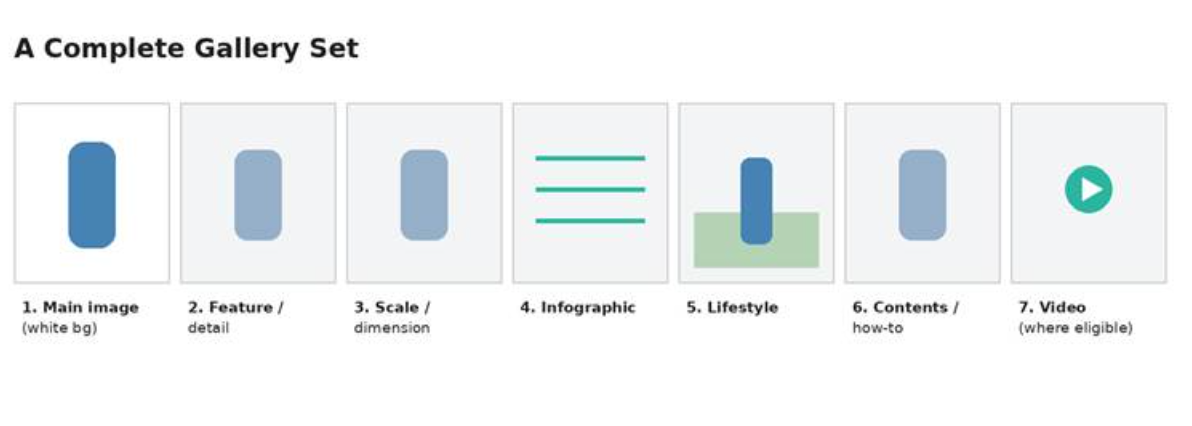
Amazon recommends providing six product images, though the number and presentation of media shown can vary by category and detail-page experience. The goal is to use the available gallery deliberately rather than filling slots for the sake of it. Build a complete image set that uses each placement purposefully:
- Main image: the product on pure white, filling at least 85% of the frame.
- Feature and detail shots: close-ups of materials, texture, and key components.
- Scale and dimension: show size in context so the buyer knows what they are getting.
- Infographics: call out specifications or unique features that would be buried in text.
- Lifestyle images: the product in a real-world setting, building the connection specs alone cannot.
- Contents or how-to: reduce post-purchase confusion by showing what is included or how to set it up.
Video in the Gallery
Where you are eligible, a short video in the gallery shows function and scale that stills cannot, and it sits in the same media block as your images. It is worth treating as part of the set rather than an afterthought; our guide to Amazon product video covers the requirements and placements.
Image Suppression: What Triggers It and How to Fix It
A listing can be suppressed from search when its main image does not meet Amazon's requirements, which means shoppers cannot find it even though it is technically live. The most common triggers are a missing main image, a main image on a non-white background, or a main image containing text, logos, watermarks, or props. Because a suppressed listing simply stops appearing, the problem often goes unnoticed until sales drop.
To fix it, check the Manage Inventory suppressed-listings view or your listing quality dashboard to confirm the reason, replace the offending main image with a compliant one (pure white background, 85% product fill, no added elements), and resubmit. Suppression usually clears within a short processing window once a compliant image is in place. Auditing your main images periodically, rather than waiting for a sales dip, is the reliable way to catch this early.
Bulk Upload: File Naming and Variation Images
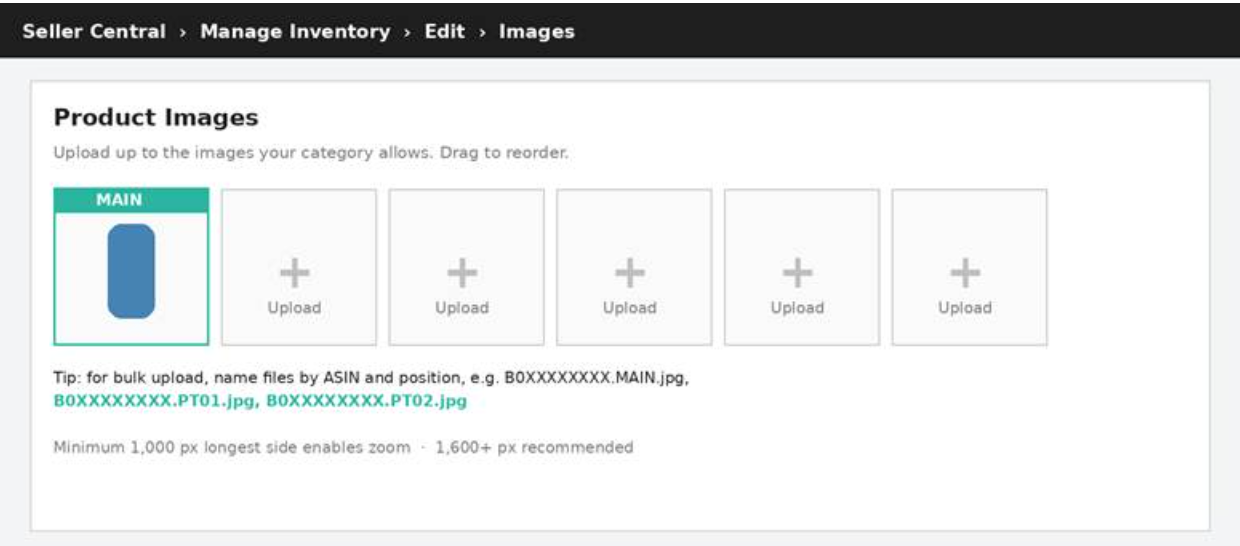
For larger catalogs, images are often uploaded in bulk rather than one listing at a time, and naming the files correctly is what tells Amazon which image goes where.
File Naming for Bulk Upload
Name each file by its ASIN and position. The main image uses the pattern ASIN.MAIN.jpg, for example B0XXXXXXXX.MAIN.jpg, and additional images use PT (point) suffixes such as B0XXXXXXXX.PT01.jpg, B0XXXXXXXX.PT02.jpg, and so on. Amazon matches each file to the correct listing and slot from that name, so a consistent naming convention prevents images landing on the wrong ASIN or in the wrong order.
Variation and Swatch Images
For parent-child listings such as color or size variations, each child ASIN needs its own image set showing that specific variant, and the swatch image is what appears as the selectable color or style thumbnail on the parent listing. Getting swatches right matters because they are the first thing a shopper interacts with when choosing a variation; a missing or mismatched swatch makes the whole variation family look unfinished.
Do Amazon Product Images Affect Search Performance?
The direct answer: images are not a documented Amazon ranking factor, but they drive click-through rate and conversion, and those do feed ranking. A stronger main image earns more clicks from the search results page, and a stronger gallery converts more of those clicks into sales; Amazon's search rewards listings that get clicked and that convert, so better images influence ranking through behavior rather than through the image content itself. That distinction matters in practice: the goal is to optimize images for clarity, click appeal, and conversion, not to try to embed keywords or signals in the image to influence ranking directly, which does not work.
Optimizing Images for the Mobile Shopper
Amazon listings are frequently viewed on small screens, where dense image copy and subtle visual details become harder to read. Design for glanceability, since shoppers on a phone skim rather than study, which is why the product filling most of the frame matters even more here. Keep important details comfortably inside the composition so they remain easy to see across different display sizes. For infographics, use larger text and fewer words than you would for desktop, because dense overlays become unreadable on a phone.
Common Amazon Image Mistakes to Avoid
The errors that quietly cost conversions:
- Clutter: overloading images with text, badges, or logos overwhelms shoppers on small screens.
- Genericism: images that look like every competitor's turn your product into a commodity.
- An incomplete set: leaving the gallery thin forfeits chances to answer buyer questions.
- Inconsistency: a mismatched visual style across the set undercuts brand trust.
- Ignoring suppression: a non-compliant main image can pull the listing from search until it is fixed.
Because images work as a system with your A+ Content and the rest of the listing, we treat them as one part of full Amazon listing optimization. For the deeper A+ module and image-size specifics, our Amazon A+ Content image sizes guide covers the exact dimensions.
Frequently Asked Questions About Amazon Product Image Optimization
| Why is my Amazon listing image suppressed? |
| Most often because the main image breaks a requirement: a missing main image, a non-white background, or text, a logo, or props in the frame. Check the suppressed-listings view in Manage Inventory for the exact reason, replace the main image with a compliant one, and resubmit. |
| How do I name image files for Amazon bulk upload? |
| Name each file by ASIN and position: B0XXXXXXXX.MAIN.jpg for the main image and B0XXXXXXXX.PT01.jpg, B0XXXXXXXX.PT02.jpg for additional images. Amazon uses the filename to match each image to the right listing and slot. |
| Do product images affect Amazon ranking? |
| Not as a documented direct factor, but they drive click-through and conversion, which do feed ranking. Optimize images to earn clicks and convert them rather than trying to influence ranking through the image itself. |
| How many images should an Amazon listing have? |
| Amazon recommends about six, though it varies by category. What matters more than the count is that each image does a distinct job: main, detail, scale, infographic, lifestyle, and a contents or how-to shot. |
| What size and format should Amazon images be? |
| At least 1,000 pixels on the longest side to enable zoom, with 1,600 or more recommended. JPEG is preferred; PNG, TIFF, and GIF are also accepted. There is no required aspect ratio. |
Compliance Is the Floor. Conversion Is the Job.
This guide covers what Amazon requires and what makes an image set convert. Producing and placing that set across a full catalog is the core of our Amazon creative services.
Images That Clear the Rules but Don't Convert?
A compliant image set is the floor, not the finish line. We plan and produce main images, infographics, and lifestyle shots built to convert on small screens, then place them across your detail pages and A+ Content.